> ## Documentation Index
> Fetch the complete documentation index at: https://docs.sezzle.com/llms.txt
> Use this file to discover all available pages before exploring further.
# Introduction
Customer tokenization allows merchants to store Sezzle as a payment method for future orders without customer interaction, ideal for subscriptions like semi-annual charges.
All tokenized orders will be processed as Pay in Full.
Before you can charge a customer this way, they must authorize you to process future transactions on their behalf. There are two ways to obtain that authorization:
* [**Tokenization during checkout**](#tokenization-during-checkout) — the customer authorizes you while completing a purchase. Available to all merchants.
* [**Standalone tokenization**](#standalone-tokenization) — the customer authorizes you without making a purchase.
## Tokenization during checkout
To obtain authorization alongside a purchase:
1. Initiate and tokenize the order in a single session
2. Redirect the customer to the checkout URL
For detailed instructions, view the Tokenization Process below.
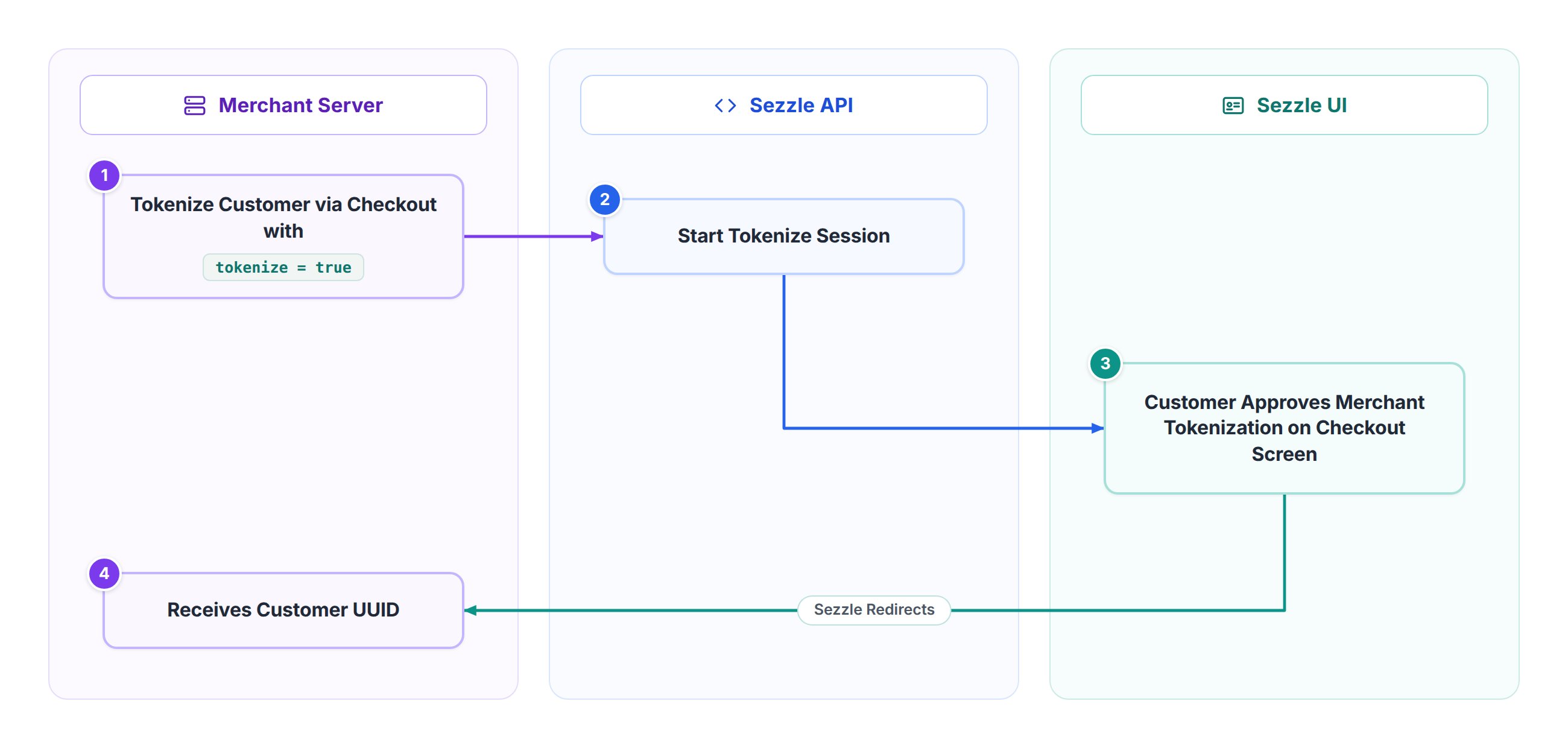
### Tokenization Process
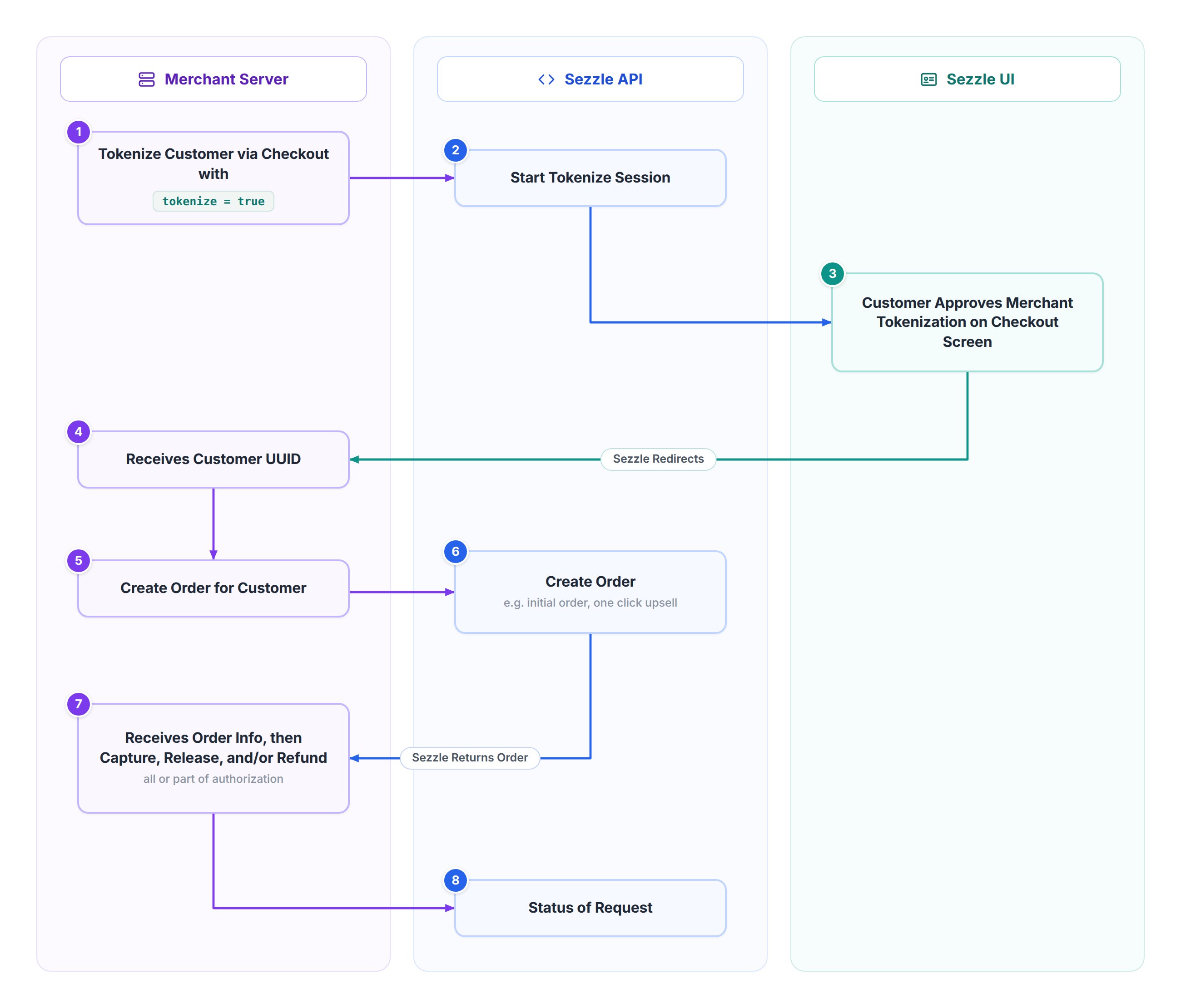
 1. Tokenize Customer via Checkout
* The merchant calls `/v2/session` with `tokenize: true`, optionally including customer details to speed up registration for new Sezzle users.
* Sezzle returns a session `tokenize` token.
2. Merchant Redirects User to Checkout URL
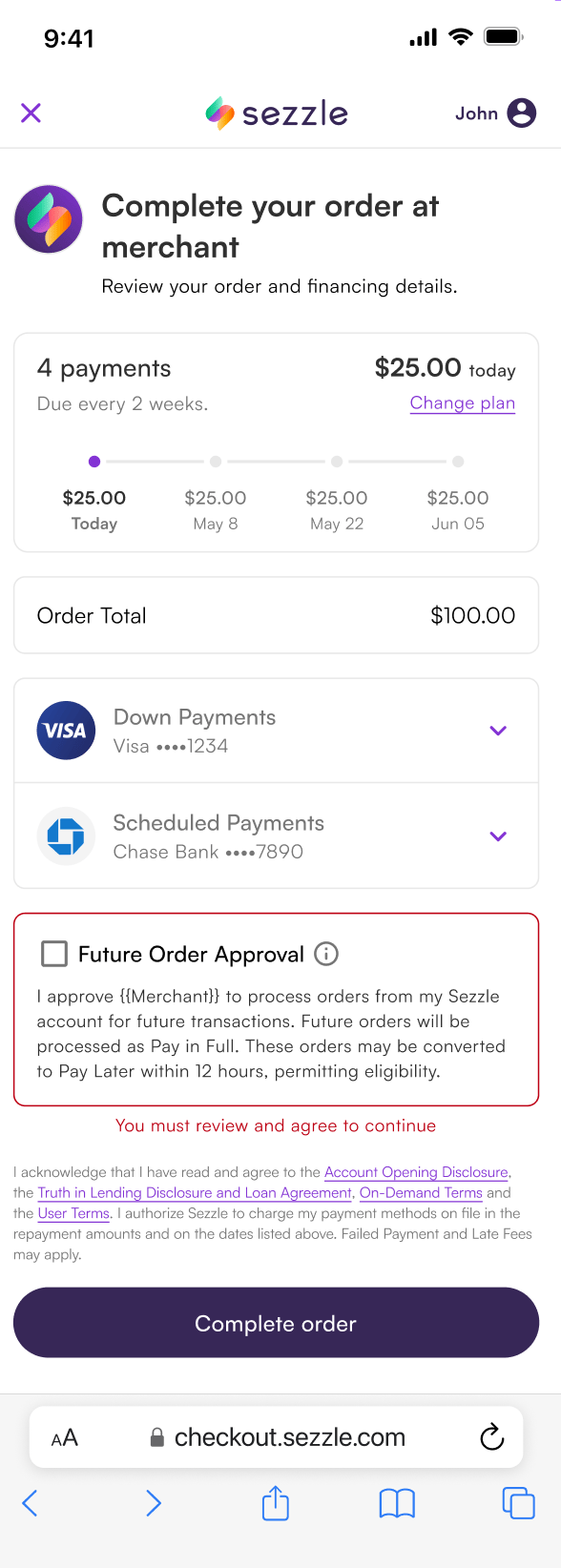
* Customer sees option to allow merchant to process payments from their Sezzle account for future transactions.
* The customer may decide to allow this permission before completing their checkout.
On this flow, the customer can only grant the permission during the initial checkout. If they decline, you can ask them again later with [standalone tokenization](#standalone-tokenization) rather than reusing this session.
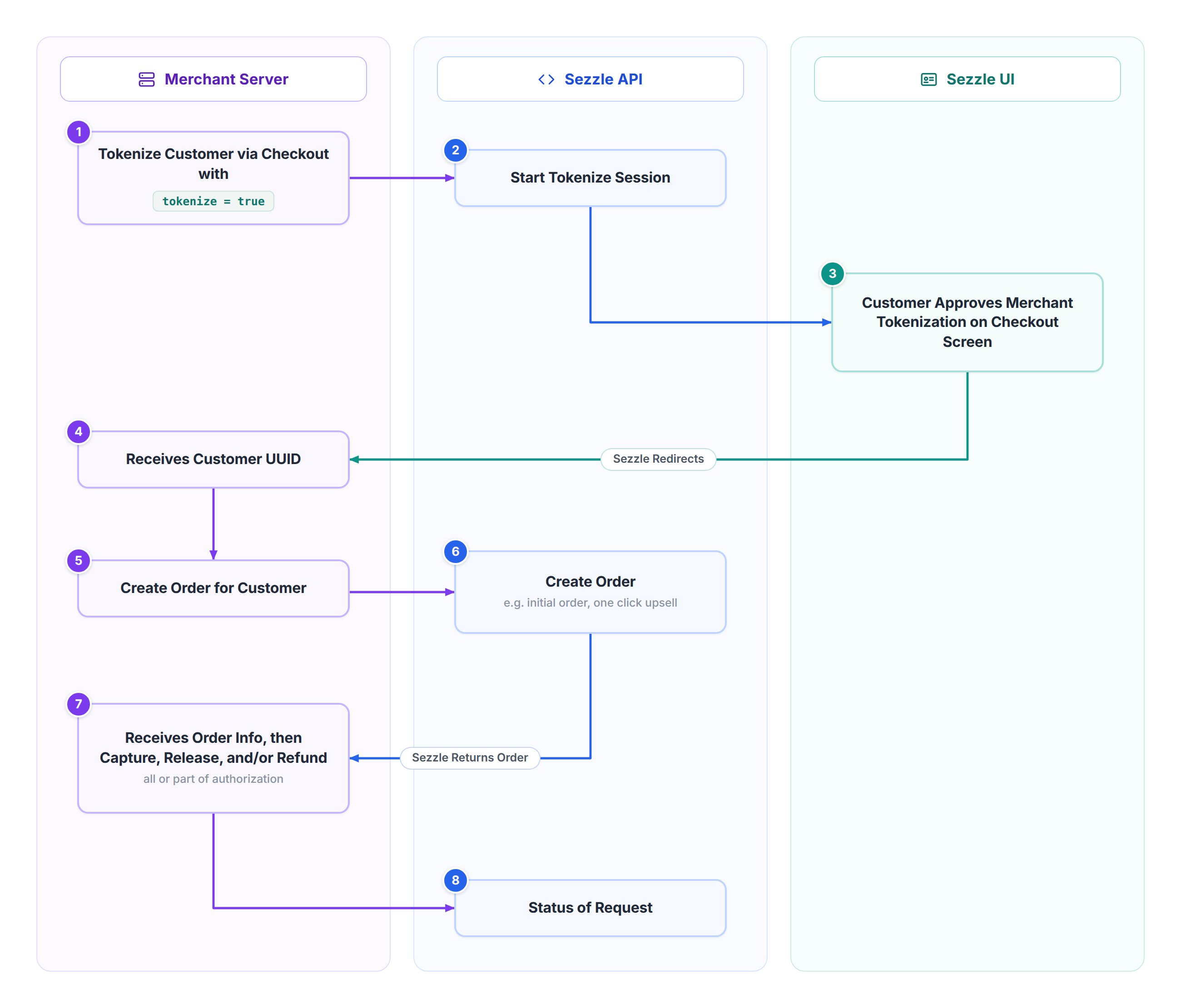
1. Tokenize Customer via Checkout
* The merchant calls `/v2/session` with `tokenize: true`, optionally including customer details to speed up registration for new Sezzle users.
* Sezzle returns a session `tokenize` token.
2. Merchant Redirects User to Checkout URL
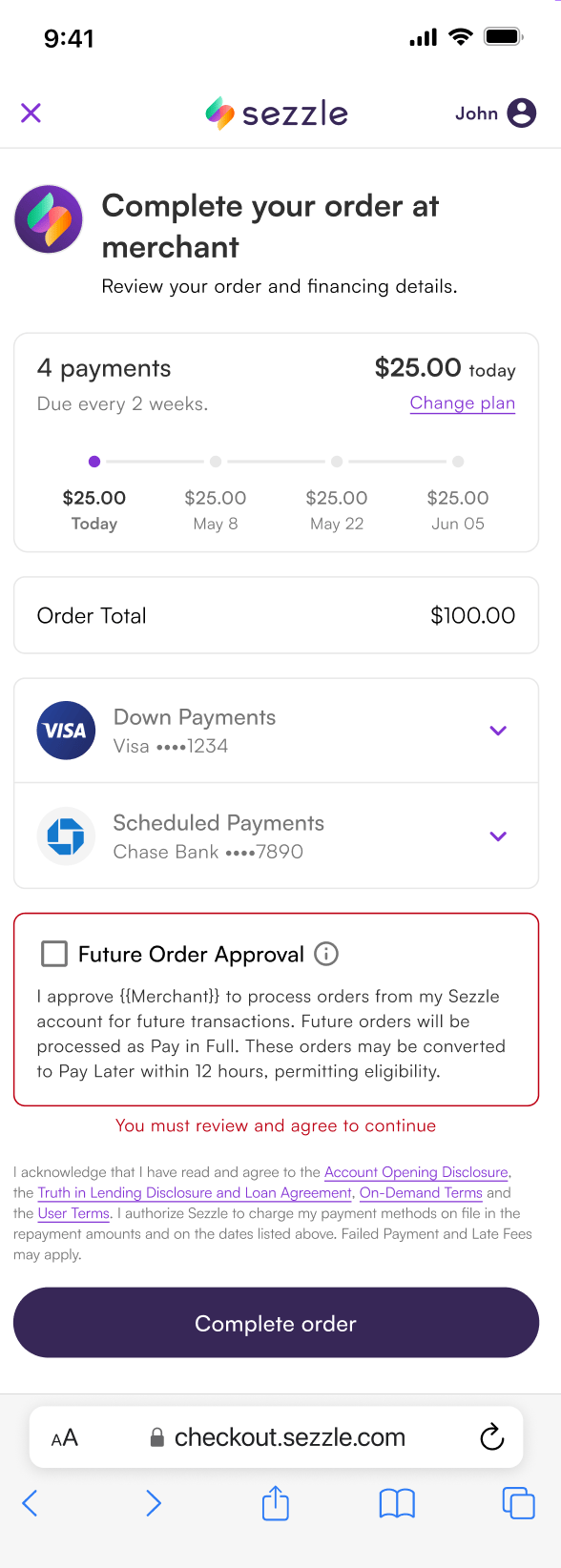
* Customer sees option to allow merchant to process payments from their Sezzle account for future transactions.
* The customer may decide to allow this permission before completing their checkout.
On this flow, the customer can only grant the permission during the initial checkout. If they decline, you can ask them again later with [standalone tokenization](#standalone-tokenization) rather than reusing this session.
 * If agreed, Sezzle redirects back to the merchant’s session complete URL, appending a `customer-uuid` query parameter.
* Alternatively, the merchant can call `/v2/token` with the session tokenize token to retrieve the UUID.
3. Charge Customer
* The merchant uses the `customer-uuid` to create orders via `/v2/customer/{customer_uuid}/order`.
* If the authorization is approved, the merchant can manage the order (release, capture, or refund) using `/v2/order` endpoints.
## Standalone tokenization
Standalone tokenization asks a customer to authorize you **without making a purchase**.
Standalone tokenization is currently only enabled for select merchants. Contact your account manager to have it turned on for your account.
* If agreed, Sezzle redirects back to the merchant’s session complete URL, appending a `customer-uuid` query parameter.
* Alternatively, the merchant can call `/v2/token` with the session tokenize token to retrieve the UUID.
3. Charge Customer
* The merchant uses the `customer-uuid` to create orders via `/v2/customer/{customer_uuid}/order`.
* If the authorization is approved, the merchant can manage the order (release, capture, or refund) using `/v2/order` endpoints.
## Standalone tokenization
Standalone tokenization asks a customer to authorize you **without making a purchase**.
Standalone tokenization is currently only enabled for select merchants. Contact your account manager to have it turned on for your account.
 ### 1. Create a tokenize-only session
Call [`POST /v2/session`](/docs/api/core/sessions/postv2session) with `customer.tokenize` set to `true` and **no `order` object**:
```json theme={"system"}
{
"customer": {
"tokenize": true,
"email": "test@sezzle.com",
"first_name": "Test",
"last_name": "Customer"
},
"complete_url": {
"href": "https://example.com/tokenization/complete"
}
}
```
Sezzle responds with the merchant request token and an `approval_url`:
```json theme={"system"}
{
"uuid": "fadbc642-05a4-4e38-9e74-80e325623af9",
"tokenize": {
"token": "7ec98824-67cc-469c-86ab-f9e047f9cf1a",
"expiration": "2026-04-27T14:46:59Z",
"approval_url": "https://checkout.sezzle.com/?id=12a34bc5-6de7-890f-g123-4hi1238jk902"
}
}
```
No order is created and the customer is never charged. Including customer details is optional but speeds up registration for new Sezzle users.
Create the session at the moment the customer clicks to authorize. The `approval_url` stops working after **30 minutes**, which is shorter than the `expiration` shown in the response — that timestamp is the request token's lifetime, not the URL's. Sessions created ahead of time, emailed, or stored for later will present the customer with an expired page.
### 2. Redirect the customer to the approval URL
The customer sees the same consent screen as the checkout flow, without a purchase to complete. If they approve, Sezzle returns them to the `complete_url` you supplied on the session. Supply a `cancel_url` as well if you want a separate destination for customers who decline.
### 3. Retrieve the customer UUID
Because no order is involved, the customer UUID reaches you through three channels:
* **The `customer.tokenized` webhook** — the reliable, server-to-server channel. Treat this as your source of truth.
* **The return redirect** — when the customer approves, Sezzle appends the customer UUID to your `complete_url` as the `customer-uuid` query parameter. This is immediate but not guaranteed: the customer may close the tab before returning, and URL parameters should be verified server-side rather than trusted directly.
* **Polling** — call [`GET /v2/token/{token}/session`](/docs/api/tokenization/session/getv2sessiontoken) with the `tokenize.token` from step 1. Use this as the reconciliation fallback for any approval you did not receive through the other channels; the request token remains pollable for 24 hours.
Subscribe to the [`customer.tokenized` webhook](/docs/api/core/webhooks/infov2webhooks) **before** going live with standalone tokenization. If your account is not subscribed to that event, approvals complete successfully but no notification is sent — there is no error. Polling and the redirect parameter are then your only ways to learn a customer approved.
Calling [`GET /v2/session/{uuid}`](/docs/api/core/sessions/getv2session) also returns `tokenize.approval_url` for a standalone session. No `order` block is returned, because no order exists:
```json theme={"system"}
{
"uuid": "fadbc642-05a4-4e38-9e74-80e325623af9",
"tokenize": {
"token": "7ec98824-67cc-469c-86ab-f9e047f9cf1a",
"expiration": "2026-04-27T14:46:59Z",
"approval_url": "https://checkout.sezzle.com/?id=12a34bc5-6de7-890f-g123-4hi1238jk902"
}
}
```
### 4. Charge the customer
From here the flow is identical to tokenization during checkout — use the customer UUID to create orders via `/v2/customer/{customer_uuid}/order` and manage them with the `/v2/order` endpoints.
## Notes
* Tokenization is optional, recommended only for charging via Sezzle outside standard checkouts.
* Orders created via customer UUID are treated the same as those from a standard Sezzle checkout.
## Customers
Use the customers endpoints to:
* [Delete](/docs/api/tokenization/customers/deletev2token) a customer
* [Get](/docs/api/tokenization/customers/getv2customer) details on an existing customer
* [Get](/docs/api/tokenization/customers/getv2customerlist) a list of customers
* [Create](/docs/api/tokenization/customers/postv2customerorder) an order for a customer
* [Preapprove](/docs/api/tokenization/customers/preapprovev2token) an amount for the customer
Customers are only those Sezzle users that have agreed to be tokenized by the merchant. A customer is unique to a merchant. This API does not include all Sezzle users.
### 1. Create a tokenize-only session
Call [`POST /v2/session`](/docs/api/core/sessions/postv2session) with `customer.tokenize` set to `true` and **no `order` object**:
```json theme={"system"}
{
"customer": {
"tokenize": true,
"email": "test@sezzle.com",
"first_name": "Test",
"last_name": "Customer"
},
"complete_url": {
"href": "https://example.com/tokenization/complete"
}
}
```
Sezzle responds with the merchant request token and an `approval_url`:
```json theme={"system"}
{
"uuid": "fadbc642-05a4-4e38-9e74-80e325623af9",
"tokenize": {
"token": "7ec98824-67cc-469c-86ab-f9e047f9cf1a",
"expiration": "2026-04-27T14:46:59Z",
"approval_url": "https://checkout.sezzle.com/?id=12a34bc5-6de7-890f-g123-4hi1238jk902"
}
}
```
No order is created and the customer is never charged. Including customer details is optional but speeds up registration for new Sezzle users.
Create the session at the moment the customer clicks to authorize. The `approval_url` stops working after **30 minutes**, which is shorter than the `expiration` shown in the response — that timestamp is the request token's lifetime, not the URL's. Sessions created ahead of time, emailed, or stored for later will present the customer with an expired page.
### 2. Redirect the customer to the approval URL
The customer sees the same consent screen as the checkout flow, without a purchase to complete. If they approve, Sezzle returns them to the `complete_url` you supplied on the session. Supply a `cancel_url` as well if you want a separate destination for customers who decline.
### 3. Retrieve the customer UUID
Because no order is involved, the customer UUID reaches you through three channels:
* **The `customer.tokenized` webhook** — the reliable, server-to-server channel. Treat this as your source of truth.
* **The return redirect** — when the customer approves, Sezzle appends the customer UUID to your `complete_url` as the `customer-uuid` query parameter. This is immediate but not guaranteed: the customer may close the tab before returning, and URL parameters should be verified server-side rather than trusted directly.
* **Polling** — call [`GET /v2/token/{token}/session`](/docs/api/tokenization/session/getv2sessiontoken) with the `tokenize.token` from step 1. Use this as the reconciliation fallback for any approval you did not receive through the other channels; the request token remains pollable for 24 hours.
Subscribe to the [`customer.tokenized` webhook](/docs/api/core/webhooks/infov2webhooks) **before** going live with standalone tokenization. If your account is not subscribed to that event, approvals complete successfully but no notification is sent — there is no error. Polling and the redirect parameter are then your only ways to learn a customer approved.
Calling [`GET /v2/session/{uuid}`](/docs/api/core/sessions/getv2session) also returns `tokenize.approval_url` for a standalone session. No `order` block is returned, because no order exists:
```json theme={"system"}
{
"uuid": "fadbc642-05a4-4e38-9e74-80e325623af9",
"tokenize": {
"token": "7ec98824-67cc-469c-86ab-f9e047f9cf1a",
"expiration": "2026-04-27T14:46:59Z",
"approval_url": "https://checkout.sezzle.com/?id=12a34bc5-6de7-890f-g123-4hi1238jk902"
}
}
```
### 4. Charge the customer
From here the flow is identical to tokenization during checkout — use the customer UUID to create orders via `/v2/customer/{customer_uuid}/order` and manage them with the `/v2/order` endpoints.
## Notes
* Tokenization is optional, recommended only for charging via Sezzle outside standard checkouts.
* Orders created via customer UUID are treated the same as those from a standard Sezzle checkout.
## Customers
Use the customers endpoints to:
* [Delete](/docs/api/tokenization/customers/deletev2token) a customer
* [Get](/docs/api/tokenization/customers/getv2customer) details on an existing customer
* [Get](/docs/api/tokenization/customers/getv2customerlist) a list of customers
* [Create](/docs/api/tokenization/customers/postv2customerorder) an order for a customer
* [Preapprove](/docs/api/tokenization/customers/preapprovev2token) an amount for the customer
Customers are only those Sezzle users that have agreed to be tokenized by the merchant. A customer is unique to a merchant. This API does not include all Sezzle users.